Introducing the Cell Type Explorer
A connectome (see neuPrint) is published at the finest grain it can be: every neuron and every synapse carries its own ID.
That granularity is the whole point and means anyone can query a single cell or a single connection using either the pre-built functions in the neuprint-python package or by writing their own Cypher queries to access the data directly from the Neo4j database.
However, this is often not the level of detail required for most fly experiments.
One of the great advantages of working with Drosophila melanogaster is its genetic tractability. Experimenters use flies carrying genetic constructs that label or manipulate a specific population of cells, so usually the unit of an experiment is a cell type rather than an individual cell.
Occasionally, there are populations, and genetic constructs, with only a single cell, in which case the single cell level is useful. However, more often, investigators are interested in knowing what the group of cells, for instance the T4 population, connect to and not what neuron 720575940621234567 in the database connects to.
The Cell Type Explorer exists to answer these population level questions.
It is a free, public website with one page for every cell type in the Drosophila male central nervous system connectome: 11,751 types, drawn from 164,838 neurons and nearly 172 million synapses. Each page contains pre-computed analyses, plots and interactive visualisation of representative neurons (one from each hemisphere, if they exist).
This blog post aims to take you through a general overview of the site and the pre-computed features that exist on each individual cell type’s page.
Finding a cell type
There are two ways in.
The landing page has a quick-search box. If you already know the name of the type you want, type it there and it will bring you to the cell type’s page.
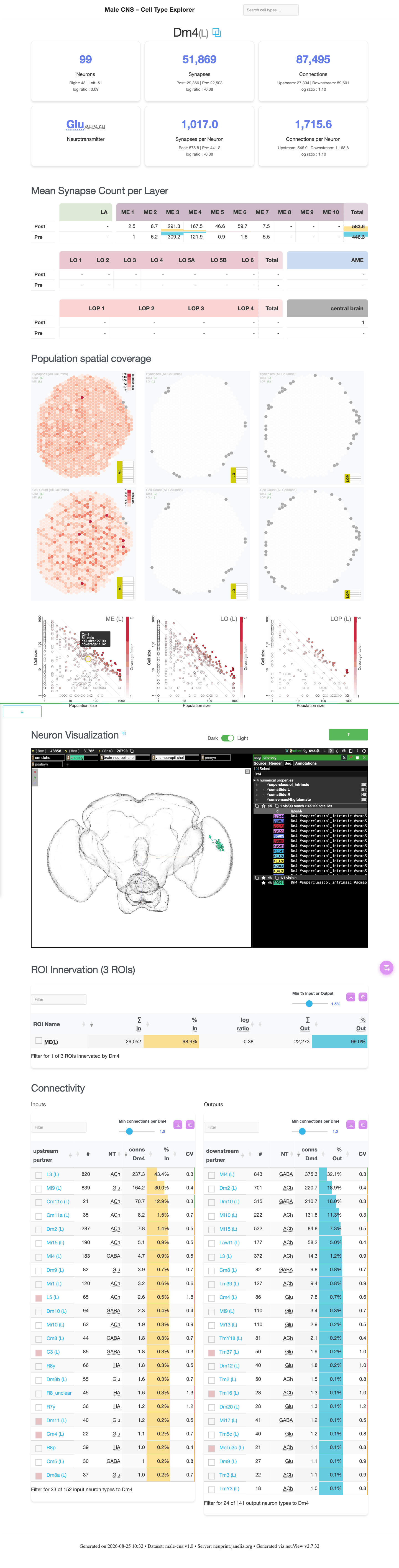
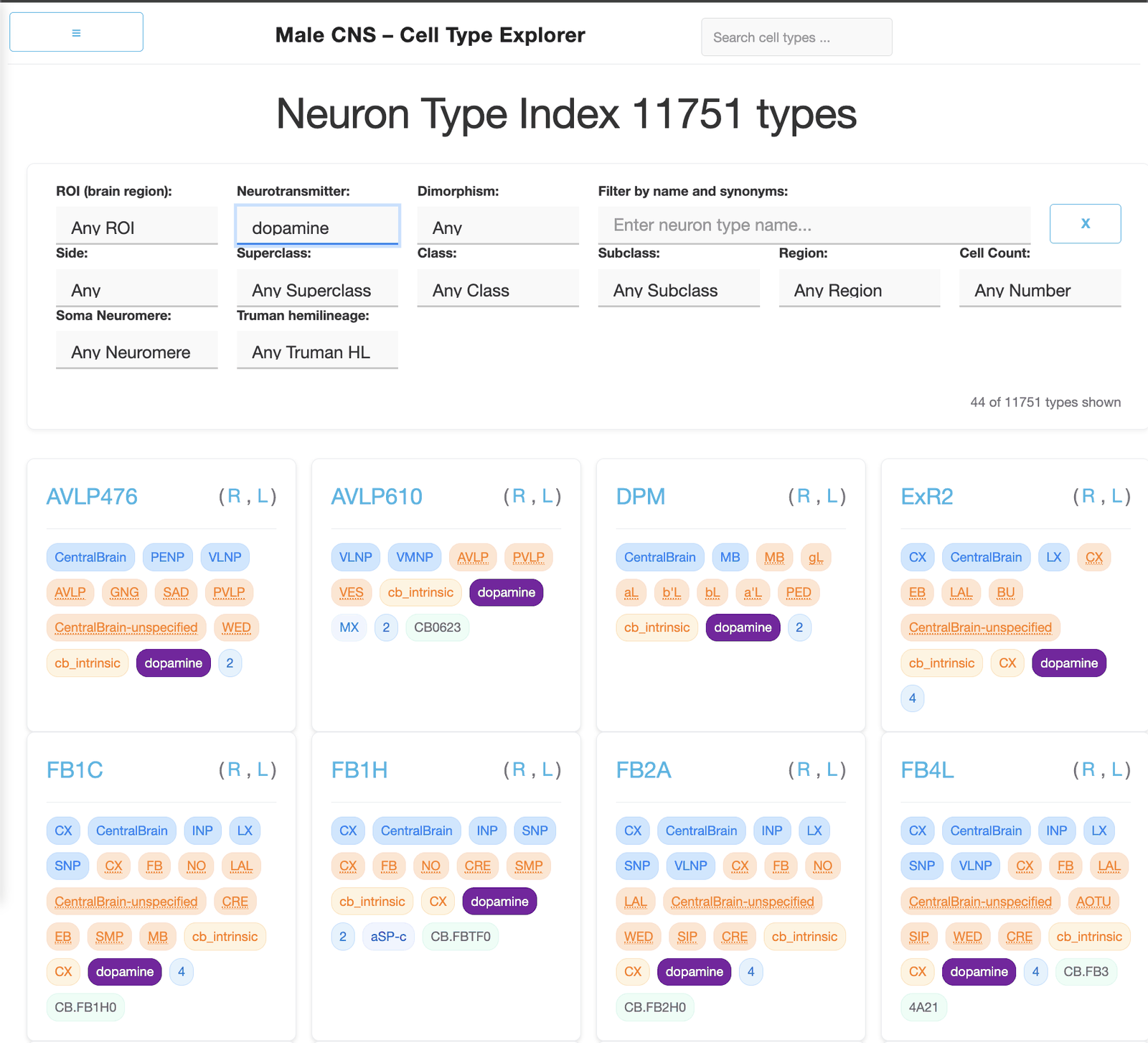
The types index is for exploring all of the types available. It lists every type in the dataset and can be narrowed by brain region, neurotransmitter, dimorphism, class, soma neuromere and cell count — so you can ask for, say, every dopaminergic type in the connectome, or every type in a particular region of interest (ROI). These classifiers can be used in combination, so you can ask for types that are both dopaminergic and within a given ROI.
One thing worth knowing before you start clicking: a type’s cells may sit in the left hemisphere, the right, or on the midline, and each type gets its own page per side as well as a combined one. The combined page is the right place to compare the two hemispheres against each other; a single-hemisphere page is the right place to look at connectivity without the other side folded in.
What is on a cell type’s page
Header
The type’s name, which hemisphere variant you are looking at (L, R, M or C), and any synonyms — useful more often than you would expect, since the same cells have frequently been named more than once across decades of literature. A link icon takes you to the same neurons in neuPrint.
Summary statistics
The block of numbers at the top, and the part most people come for:
- Neurons — how many cells of this type there are. On combined pages this is broken down per hemisphere.
- Synapses — total inputs (post-synaptic) and outputs (pre-synaptic). Worth noting that a single pre-synaptic site, a T-bar, can contact several different post-synaptic partners, so output synapse counts and connection counts are not the same thing.
- Connections — anatomical synapses upstream and downstream.
- Neurotransmitter — the predicted primary transmitter, reported with a confidence level.
- Per-neuron averages — synapses and connections divided by cell count, which is what you want when comparing types with very different numbers of cells.
- Log ratios — base-2, so zero is balanced and the sign tells you the direction of the imbalance. These make left/right and input/output asymmetries readable at a glance.
Layer coverage
For visual system types, a table of average pre- and post-synapse counts per anatomical layer — lamina (LA), medulla (ME), accessory medulla (AME), lobula (LO), lobula plate (LOP) and central brain — with vertically aligned bars showing the input/output balance in each.
This is the quickest way to see where across the regions of the optic lobe a type is present, and whether it is receiving in one layer and outputting in another.
These counts are ipsilateral synapses only and this chart is not shown on a cell type’s combined page.
Population spatial coverage heatmaps
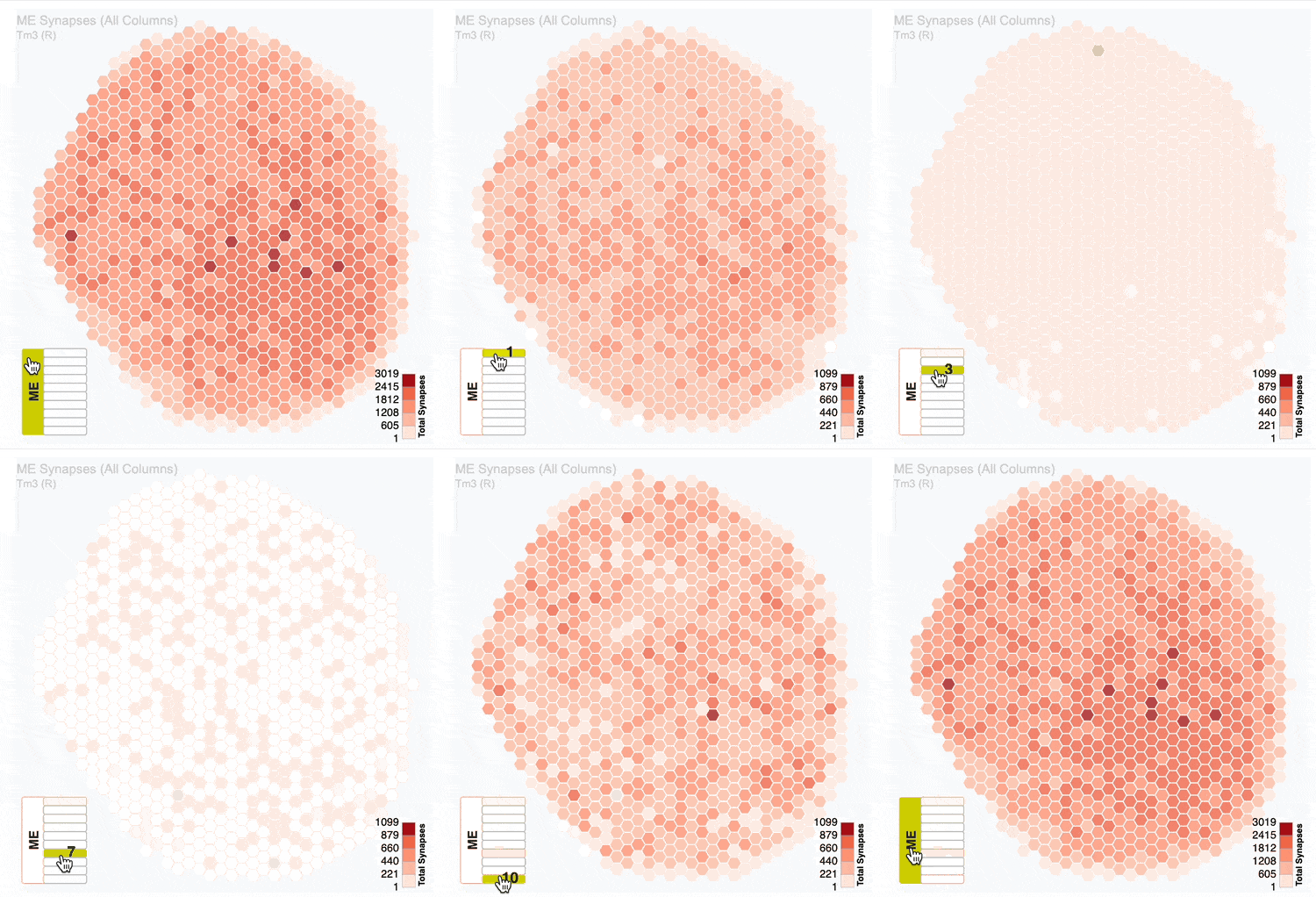
Also for visual types, and my favourite part of the resource: interactive hexagonal maps where each hexagon is a single column of the medulla, lobula or lobula plate, coloured by how many synapses (top row) or individual cells of the type (bottom row) occupy each column. You can use the layer icon in the bottom left of the plot to step through the layers or select all of them, and both the map and the colour scale update with your selection.
Because the fly’s visual system is retinotopic, these maps answer a question that is otherwise quite awkward to ask: does this cell type tile the whole eye evenly, or does it concentrate its synapses in a particular location? The maps can be downloaded as SVG or PNG.
The number of synapses per column corresponds to the total number of synapses across all cells of that type. This can include synapses from individual cells assigned to both the left and right hemispheres, however it only includes synapses in the hemisphere for which the plot has been made. For example, on a cell type’s (R) page, the value in a single column on the ME(R) plot corresponds to the total number of synapses from both (L) and (R) cells that innervate the column in the right medulla.
Population spatial coverage scatter plots
Related to the hexagonal heatmap plots above, optic lobe cell types also contain scatter plots (one per each optic lobe region ME, LO & LOP). In these plots each marker corresponds to a cell type and shows the relationship between the population size (total number of cells in that type) and the cell size (the average number of columns occupied by a single cell of that type). Each marker is coloured by that cell type’s coverage factor (the average number of cells of that type that occupy a single column).
Diagonal guidelines are drawn to represent onefold coverage, and so in theory optimally cover the optic lobe region. For example, a cell type would fall on this line if it had a population of 1 cell that covered all 892 columns in the medulla, or if a cell type had a population size of 892 that each covered one column each. Cell types that fall above the line have more neurons per column and cell types below the line have fewer neurons per column.
When the page loads, the marker corresponding to the page’s cell type will be highlighted with a tooltip displaying the values of the three key metrics. You can hover over the chart, however, to see which cell type the marker corresponds to and that type’s respective metrics.
3D morphology
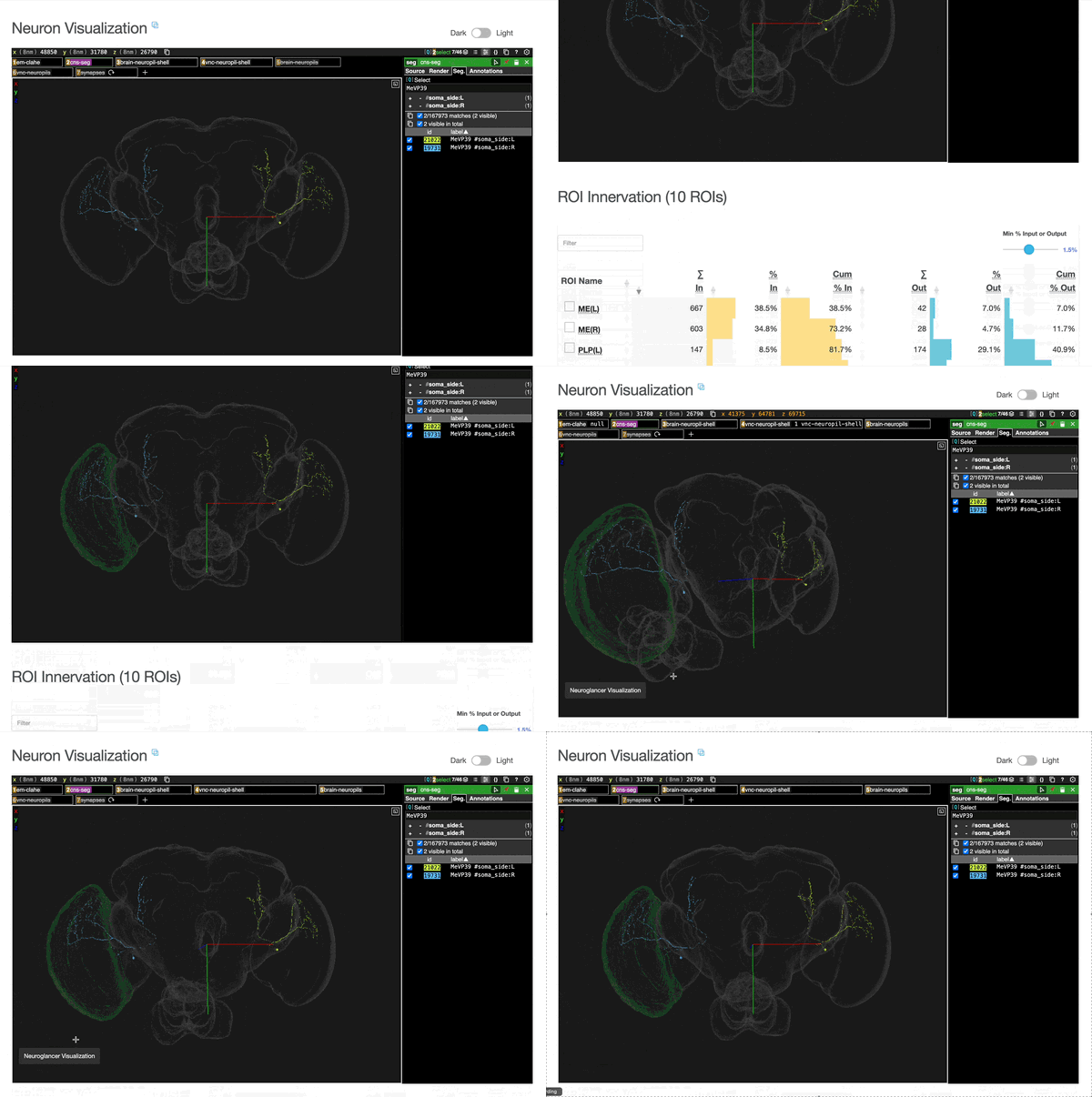
An embedded Neuroglancer view of the actual neurons, which you can rotate, pan and zoom. Reference layers can be toggled on and off, and the neurons downloaded in several formats.
The part that makes it more than a picture is that it is wired to the tables further down the page: you can add the skeleton of a connected partner cell or a brain region into the 3D view and see it rendered alongside the cells you started with. You can do this by checking the white square box next to either the cell type or ROI.
ROI innervation
A table of synapse counts per brain region, with inputs, outputs, percentage breakdowns and log ratios. By default the table only shows regions that contain at least 1.5% of the cell type’s connections but you can use the slider in the top-right corner to adjust this threshold.
Connectivity tables
At the foot of the page there are separate input and output partner tables. For each partner type you get the number of cells of that partner type connecting to the target population, the connections per neuron of the type you are looking at, the percentage of the total that partner accounts for, and a coefficient of variation.
The coefficient of variation tells you how consistent a connection is across the individual cells of the type: a partner accounting for 5% of inputs uniformly across every cell is a very different biological claim from one accounting for 5% because two cells out of forty receive a great deal of it.
The tables sort by clicking on the arrows next to the column headers, filter and search using the search bar (e.g. if you type “glu” it filters and only shows the glutamatergic partner types, or a cell type with Glu in the name).
A key feature of these tables is that they make the entire resource navigable rather than static — you can jump from a cell type to a partner type by clicking on that partner type’s name, which will take you to that cell type’s connectivity table, and so on.
Things to keep in mind
- The neurotransmitter assignments are predictions with stated confidence, not measurements.
- Connectivity is anatomical: a synapse in the dataset is a structural contact, which is not the same as a functional weight.
- The dataset is a snapshot of a single animal, and the site was built from a snapshot of that dataset. The site’s footer states which version it was built from.
Where it comes from
The Explorer is built from the male-cns:v1.0 dataset at neuPrint, generated by the FlyEM team at Janelia, and accompanies Berg et al. 2026. An earlier version, covering the optic lobe only, accompanied Nern et al. 2025.
There is a help page on the site that goes through every panel in more detail than this post does, and if you would like to know how the site was built please feel free to check out the GitHub repo for the generator that transforms the raw data into the pre-computed statistics, plots and ultimately into the html pages.